
Today
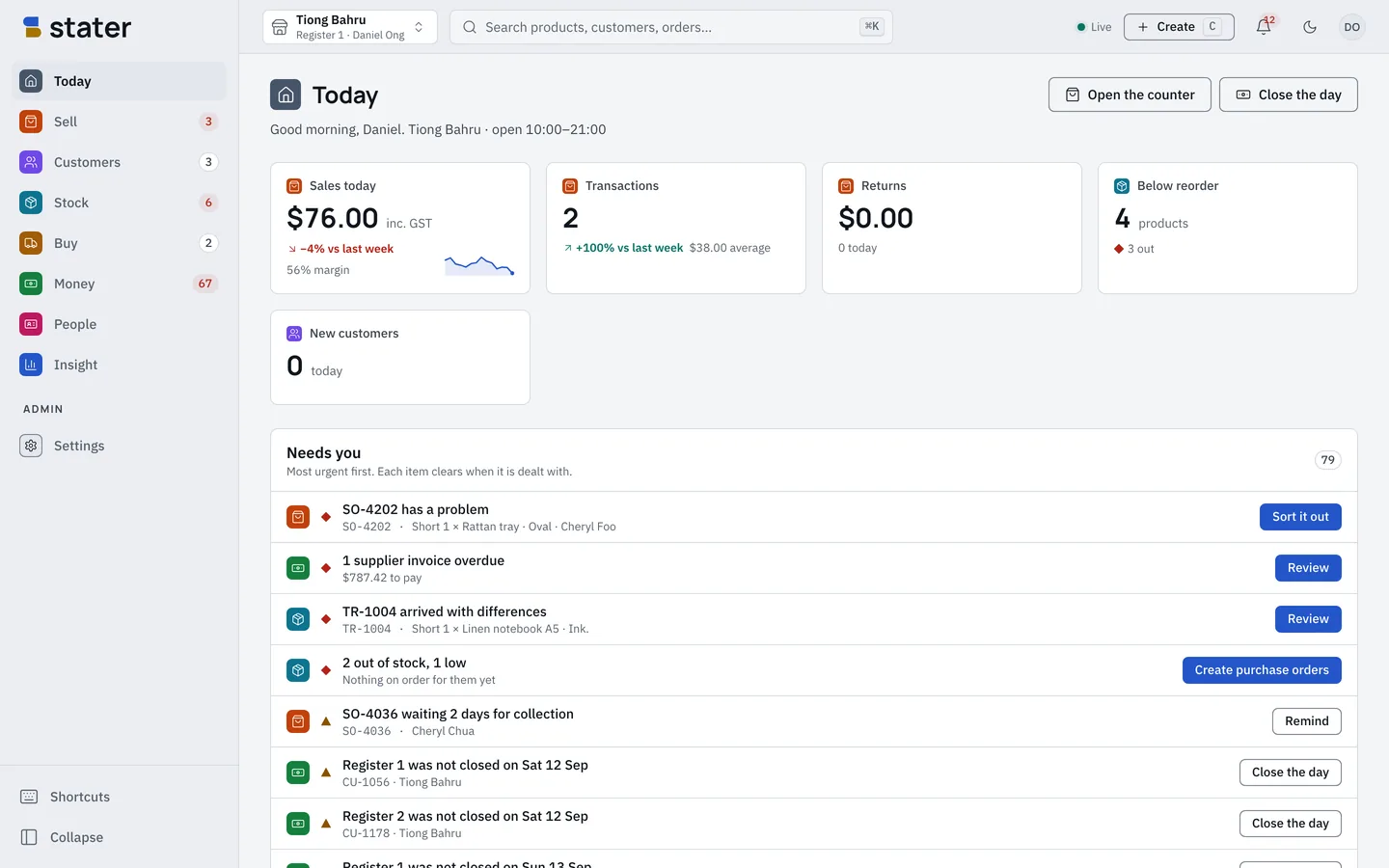
What needs you, most urgent first, with the next step one click away.
Retail software you run yourself
Stater runs the counter and online orders, customers and loyalty, stock across stores, buying, the day close, staff and rosters, and the reports. A sale moves stock, money, points and the numbers at once, so nobody types it twice.
What it runs
Today, Sell, Customers, Stock, Buy, Money, People, Insight and Admin. Each has its own colour and glyph, and they follow its records everywhere.
What needs you, most urgent first, with the next step one click away.

The counter, click and collect orders and returns, with card, cash or a split.

A 360° record with a timeline, segments, points and tiers, and follow-ups.

Levels across stores, transfers, and counts that reconcile sales made during the count.

One-click reorder into a purchase order for each supplier, and scan-to-receive deliveries.

Till counts by denomination, variance approval, banking, and payable and receivable invoices.

Staff accounts, six built-in roles, weekly rosters, a time clock and labour cost.

Dashboards and reports on sales, margin, products, staff, customers and stock, each exported to CSV.

Stores and registers, API tokens, signed webhooks, the licence and a full audit log.
Capture once
A sale moves stock, money, the customer's history and points, and the reports at once, so nobody types it twice.
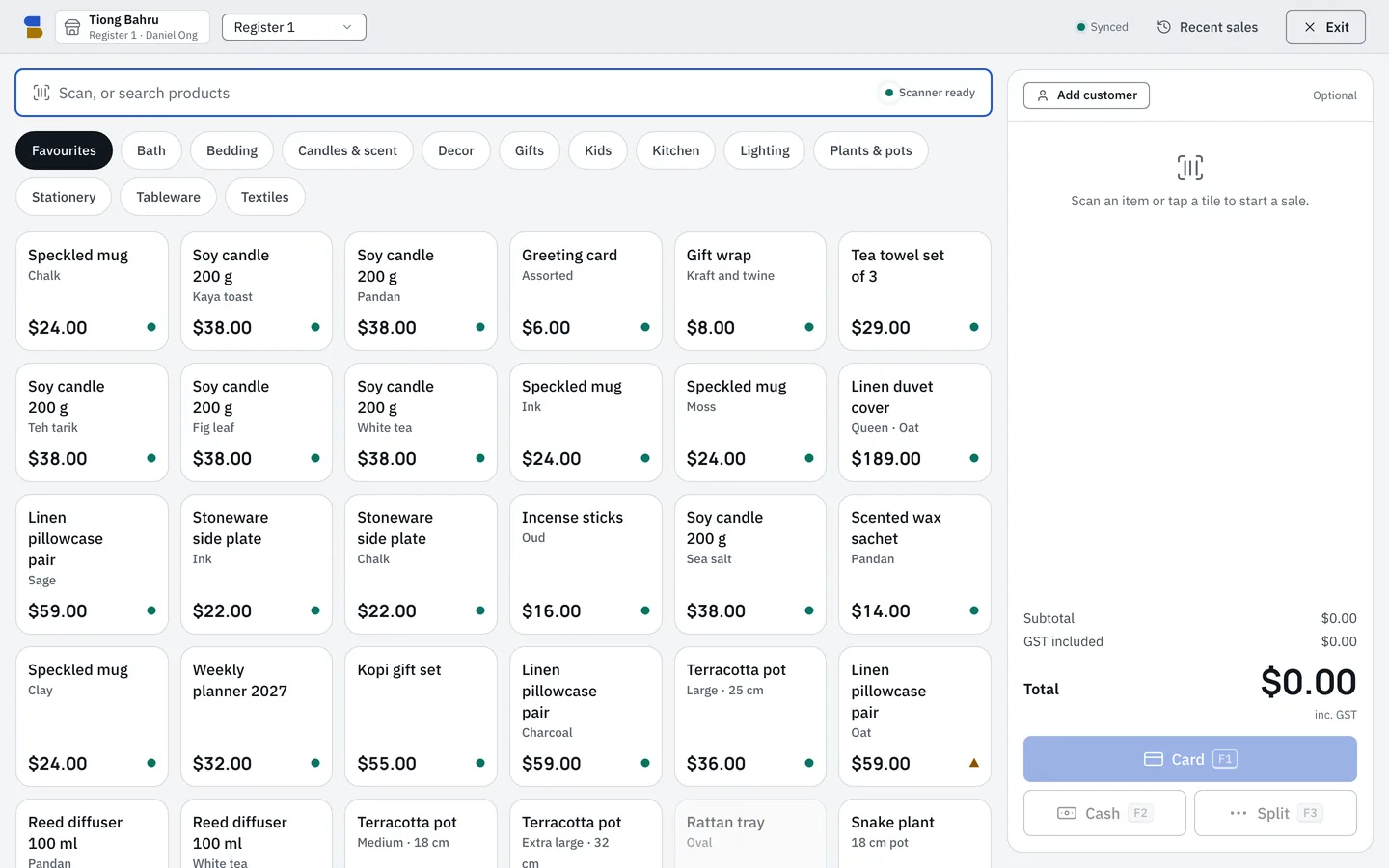
Scan, attach the customer by card or phone number, and take card, cash or a split. Card amounts are keyed into your separate terminal and the approval code is recorded.
Every stock change goes through a ledger that explains the number on screen, in every store.
The sale lands on the customer's timeline, with their points and tier.
Count the till by denomination at the end of the day. A difference over tolerance needs a manager's PIN.
The reports include it at once. On Growth and up, the day's balanced journal goes to your accounting software.
Every change is saved in one transaction: if any part fails, nothing is saved.
Features
Late collections, deliveries with differences, till variances and low stock, most urgent first, each with its next step one click away.
Scanner first, keyboard second, touch always. Attach the customer, take card, cash or a split, and the sale is sealed.
Levels across stores change as you sell. Below the reorder point, one click drafts a purchase order for each supplier.
Count the till by denomination. Variances within tolerance pass; anything more needs a manager's PIN, and the audit trail keeps it.
Design the counter's tabs, folders and tiles, with pictures, a preview, drafts and 20 kept versions.
A till keeps selling with cash and card while Stater or the network is down, and sends the sales once Stater answers.
One balanced journal for each store and trading day, as import files or sent to Xero, QuickBooks Online or Business Central.
Net revenue, gross profit and margin, GST to pay, ageing both ways and profit and loss, worked out live.
Receipts, ready-to-collect notices, purchase orders and alerts, through your own mail server or provider.
Microsoft Entra ID, Google Workspace or any OpenID Connect provider, and Active Directory or LDAP on Enterprise.
Ask in plain words and get answers with numbered sources, through the OpenAI-compatible provider you choose.
Forward security events to Splunk, Elastic, syslog or HTTPS, and read TAXII 2.1 threat feeds on Enterprise.
Scheduled, encrypted backups to a folder or S3-compatible storage, each read back after it is made.
Design
Each state has its own glyph as well as its colour, so nothing relies on colour alone.
Records edit where they are and offer Undo. Dialogs appear only for what cannot be undone, and they list every effect with its amount.
⌘K or Ctrl K finds anything, and counter mode uses 48px targets.
Both themes are equals, and both follow your device's setting.
Self-hosted
One Go binary with the web app built in, on PostgreSQL, on infrastructure you run. There is no hosted service: your data lives in your own database.
Signed .deb and .rpm packages with a hardened systemd service. sudo stater configure asks for the database, the address, the licence, email and nightly backups.
PostgreSQL 17, two or more Stater servers and an HAProxy edge on one machine. ./install.sh writes the settings and starts everything.
A Helm chart for stateless pods that run as non-root with a read-only root file system.
Sessions, live updates, the licence and the webhook outbox live in PostgreSQL, so you scale by adding a replica. Tested with two replicas behind HAProxy.
Every release file is listed in SHA256SUMS and signed with cosign. The image ships with provenance and an SBOM.
17 recommended. Managed databases and CloudNativePG work.
At 02:30 by default, encrypted with AES-256-GCM before they leave the server, and read back after each run.
Plans
Each plan has everything in the plan below it. Paid plans come with a signed licence.
Free
1 store · 5 staff accounts
Everything one shop needs, with no licence.
Talk to us
3 stores · 25 staff accounts
Adds API tokens, counter layouts, the offline counter and accounting.
Talk to us
10 stores · 100 staff accounts
Adds webhooks, finance, single sign-on and the AI assistant.
Talk to us
Unlimited stores and staff
Adds directory sign-in and threat intelligence.
Questions
In your own PostgreSQL database, on servers you run. Stater is software you install yourself, and its licence is checked on your server, offline: nothing calls home.
No. Stater is self-hosted only: one Go binary with the web app built in, on PostgreSQL, installed from Linux packages, Docker Compose or a Helm chart.
Starter is free for one store and five staff accounts, with no licence. Email, database checks and set-up, and local, scheduled and manual backups and restores are never paid extras, on any plan.
Owners get a caution from 30 days before it ends and an in-app warning from 14. After it ends, the licence keeps its limits for its grace days (14 by default), then Starter limits apply. Nothing is deleted, nobody is locked out, and renewing restores everything at once. Backups already set up, offline tills holding sales, published counter layouts and accounting sync keep going.
On Growth and up, the offline counter keeps a till selling with cash and card while Stater or the network is down. Sales keep their own receipt numbers on the till and are sent once Stater answers. The offline window is 72 hours by default.
On Growth and up, Stater sends one balanced summary journal for each store and trading day, plus supplier bills and manual customer invoices. It makes import files for Xero, QuickBooks Online, QuickBooks Desktop (experimental), MYOB, Dynamics 365, Sage and a generic double-entry CSV, and sends directly to Xero, QuickBooks Online and Business Central. Payments, bank feeds and reconciliation are not included yet.
No. Card payments are keyed into your separate card terminal, and the counter records the approval code. Receipts print from the browser.
Yes, through the REST API and webhooks: push orders with POST /orders and follow stock.changed to keep online stock in step. There is no built-in Shopify or WooCommerce connector. API tokens come with Growth and webhooks with Business.
One currency for each company, with Singapore dollars and GST by default. Prices include tax and the tax is extracted, and money is held in integer cents. On Business and up, the finance reports show GST F5 box numbers for Singapore companies.
Stater is in early access. The release files and images are not public; request early access to get them. Starter is free for one store, with no licence.
Tell us about your shops, how many stores and staff you have, and how you sell today. KazLabs will reply about early access.